How to Create Items using Quick Create and AI
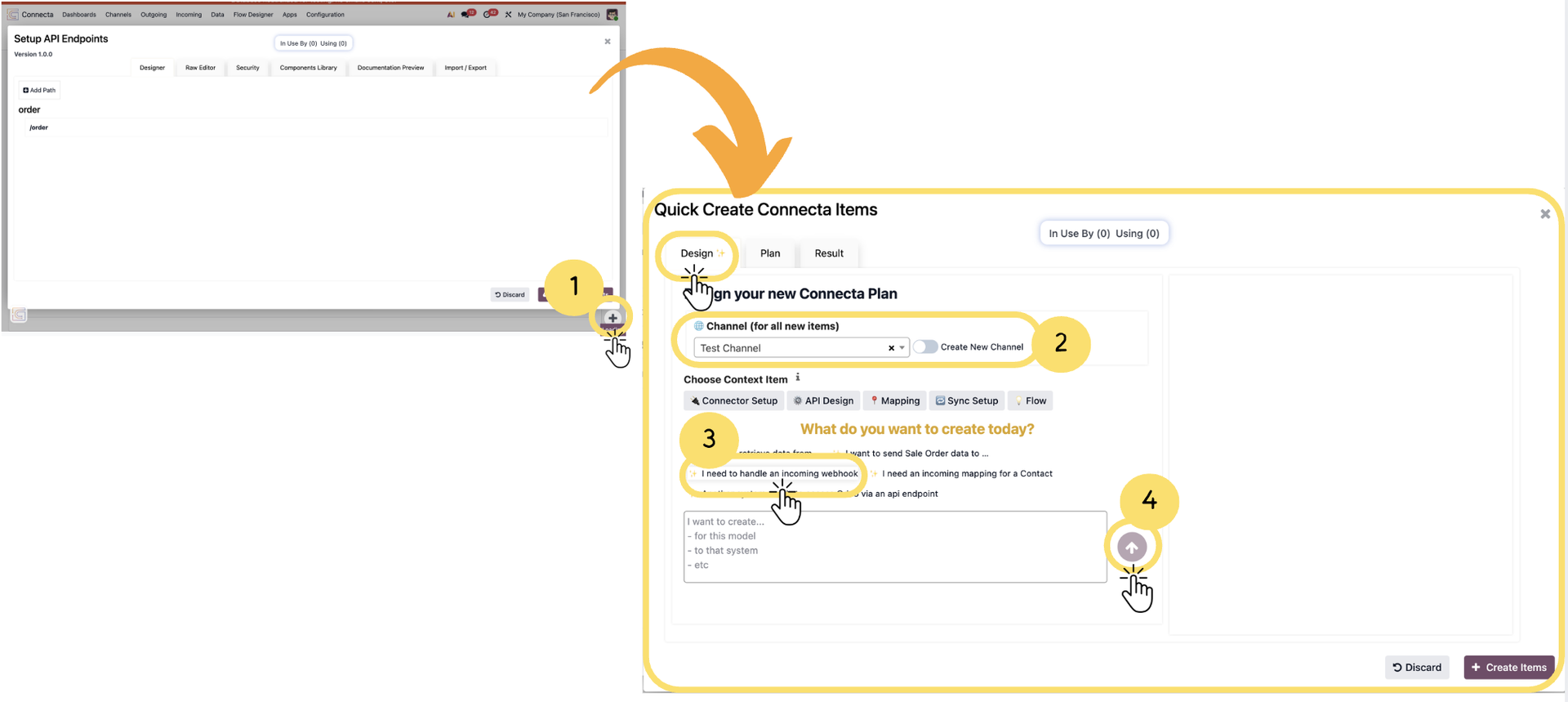
This guide explains how to quickly create an incoming webhook in Connecta using the Quick Create feature. Quick Create provides an easy, guided way to set up the required API endpoint, flow, and optional mapping based on your scenario. It leverages the Design tab (AI-assisted setup) to help you generate configurations efficiently, making it one of many ways you can define and build integration components in Connecta.
Important
In this guide, we are specifically demonstrating the creation of an incoming webhook as one example scenario. Depending on your requirements, you can use the same process to create different types of setups using the Design tab.
1. Make sure you are on the Design tab, where you can define what you want to create. Click on the ➕ (plus) button from the bottom right to launch Quick Create Connecta Items.
Unlock the full Connecta experience
Join Connecta and discover the number one connection suite for Odoo. Access full documentation, guides, and integration knowledge.
Join Connecta now