You're in a sales meeting with a new Odoo lead. The company is ready to run sales, stock, and purchasing in Odoo. Then someone from finance says, "The accounting is ours. It stays in Exact Online." They're also talking to another partner, and that one already has a connector.
From that moment, the project has a new requirement. Two systems have to agree on every invoice, every payment, and every account. And that sync is where the complications start.
This guide is for the Odoo partner facing this situation. It covers why companies keep Exact Online next to Odoo, which data needs to move between them, the ways to connect them, and the questions worth asking before you choose a connector.
Key takeaways
- Some companies that run Odoo for their operations keep Exact Online for accounting. One of the reasons: their accountant already works in it.
- Sending a single invoice is easy. The hard part is matching the chart of accounts and knowing what happens when a sync fails.
- Before choosing any tool, decide which system is the master for each kind of data. Then ask where errors show up and how you fix them.
- Connecta's Exact Online connector for Odoo runs inside Odoo. It matches the chart of accounts of both systems, and it lets you see failures and reprocess them without leaving Odoo.
Why do companies keep Exact Online next to Odoo?
Not every company can move its accounting into Odoo. Some keep Exact Online for reasons like these:
- The business is part of a group.
- The accountant uses Exact Online and doesn't know Odoo yet.
- The move to Odoo has to wait for the end of the next fiscal year.
Sometimes the request is simple: the invoices created in Odoo should reach the accountant's Exact Online without anyone typing them again.
What data should sync between Odoo and Exact Online?
At minimum, you need the invoices, the contacts they belong to, and the payments. And the list doesn't stand still: when the customer adds new fields in an internal project, the sync has to keep up.
An invoice doesn't travel alone. It refers to a customer, to products, and to accounts, and each of them needs a counterpart on the other side.
So before you pick a tool, settle one thing: which system is the master for which data.
In practice, that means deciding where invoices and payments are created, where contacts and products can change, and where the accounting setup lives.
What is the hardest part of connecting Odoo and Exact Online?
Matching the chart of accounts between the two systems: every account on one side needs its pair on the other.
It sounds like a setup task you do once. But every invoice depends on it. If an account is matched wrong, every invoice that uses it is booked in the wrong place, and it's the accountant who finds it.
Connecta handles this with sync tables. The connector retrieves Exact Online's general ledger accounts, journals, VAT codes, and payment conditions. It imports them into Odoo, where each one is matched with its Odoo counterpart.
Take the customer account, the one that holds what customers owe you. In Exact Online's standard Dutch chart of accounts, it's 1300 Debiteuren (met subadm.). In Odoo with the Dutch localization, it's 110000 Debiteuren. The sync table pairs them, and it works the same way for journals, VAT codes, and payment conditions.
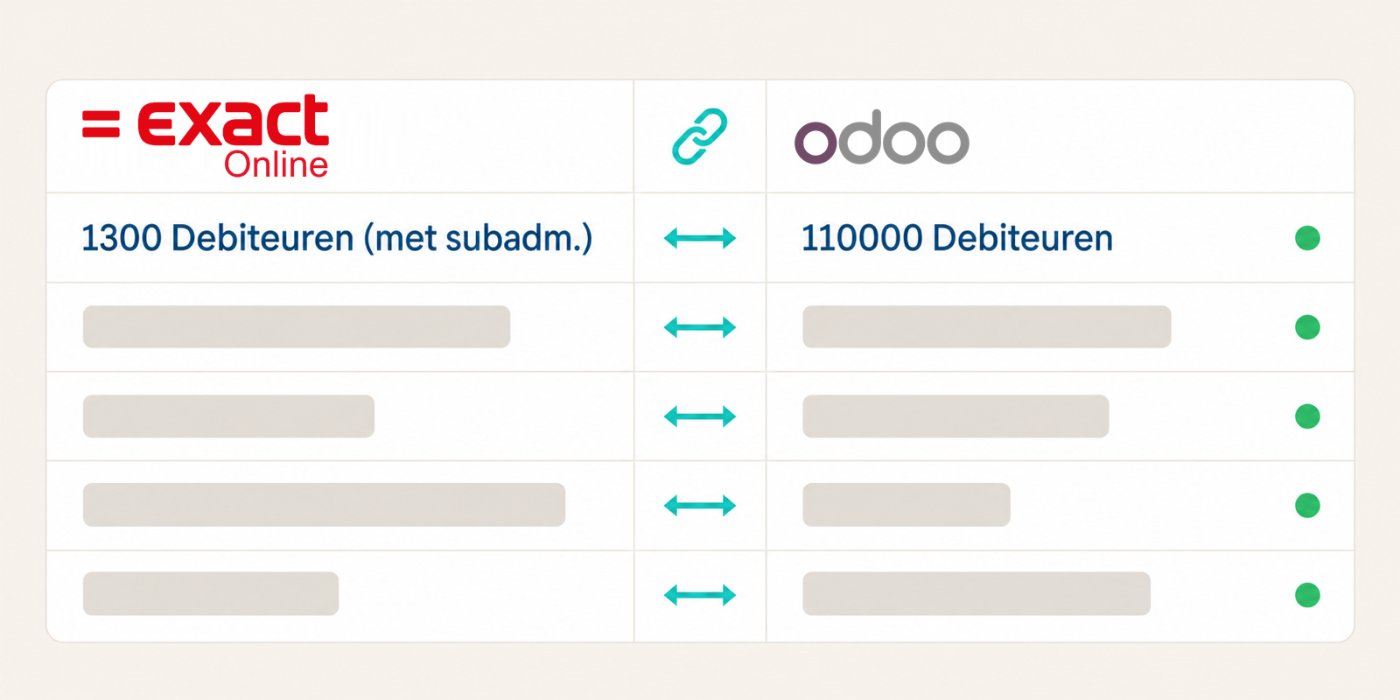
You don't have to pair them one by one. Auto matching pairs them for you, and you review the result in Odoo, table by table.
What are the integration options for Odoo and Exact Online?
There are five ways to connect Odoo and Exact Online: general automation tools, SQL-based integration tools, custom development, integration platforms, and apps inside Odoo.
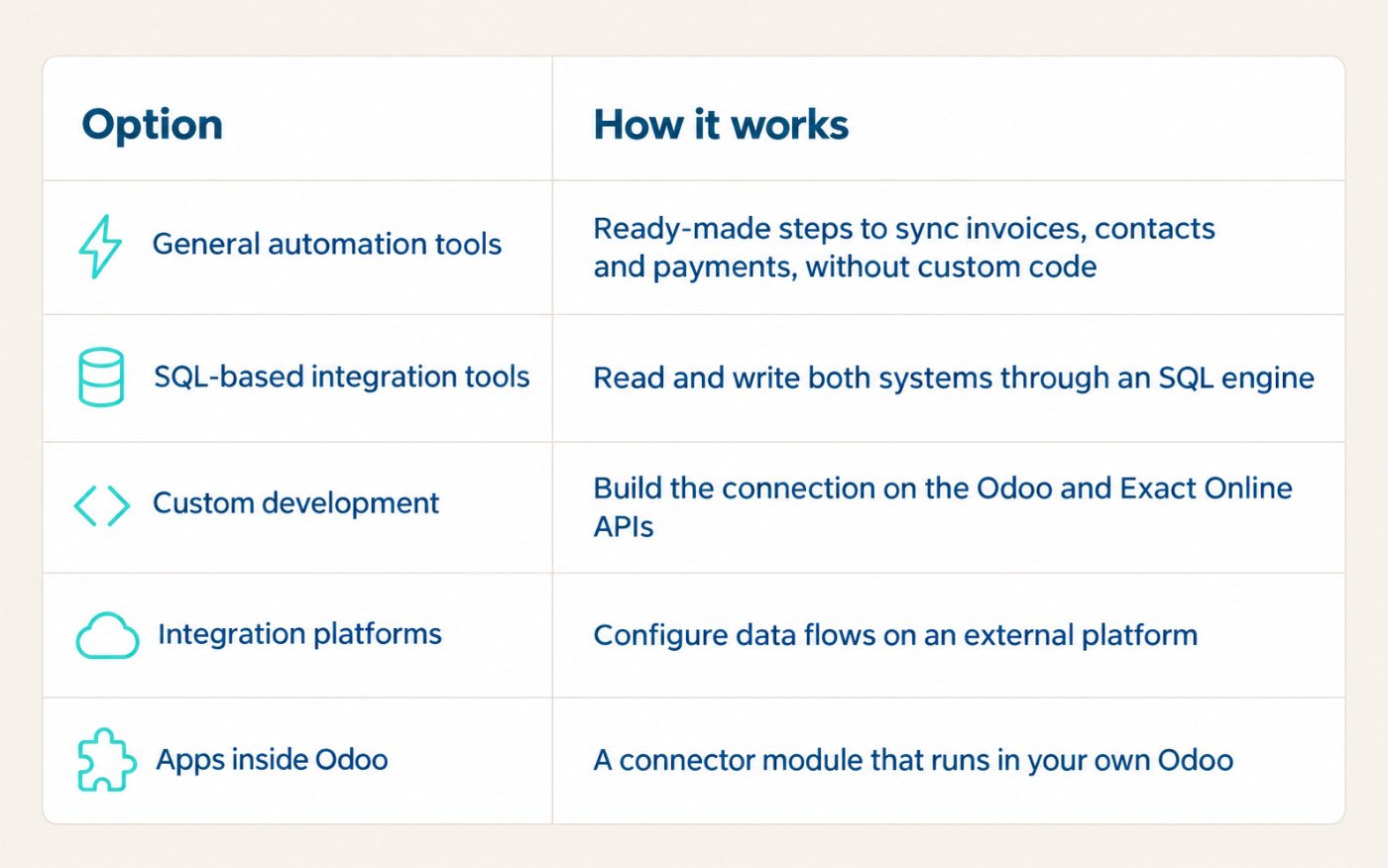
Each of them can move an invoice from Odoo to Exact Online. They differ in where they run, how they're set up, and what happens after the invoice has left Odoo.
What should an Odoo partner check before choosing a connector?
Now the project is live. Your customer calls: an invoice didn't reach Exact, and the accountant is waiting. You work with Odoo every day, not with Exact Online. These are the questions that decide how that conversation with your customer goes:
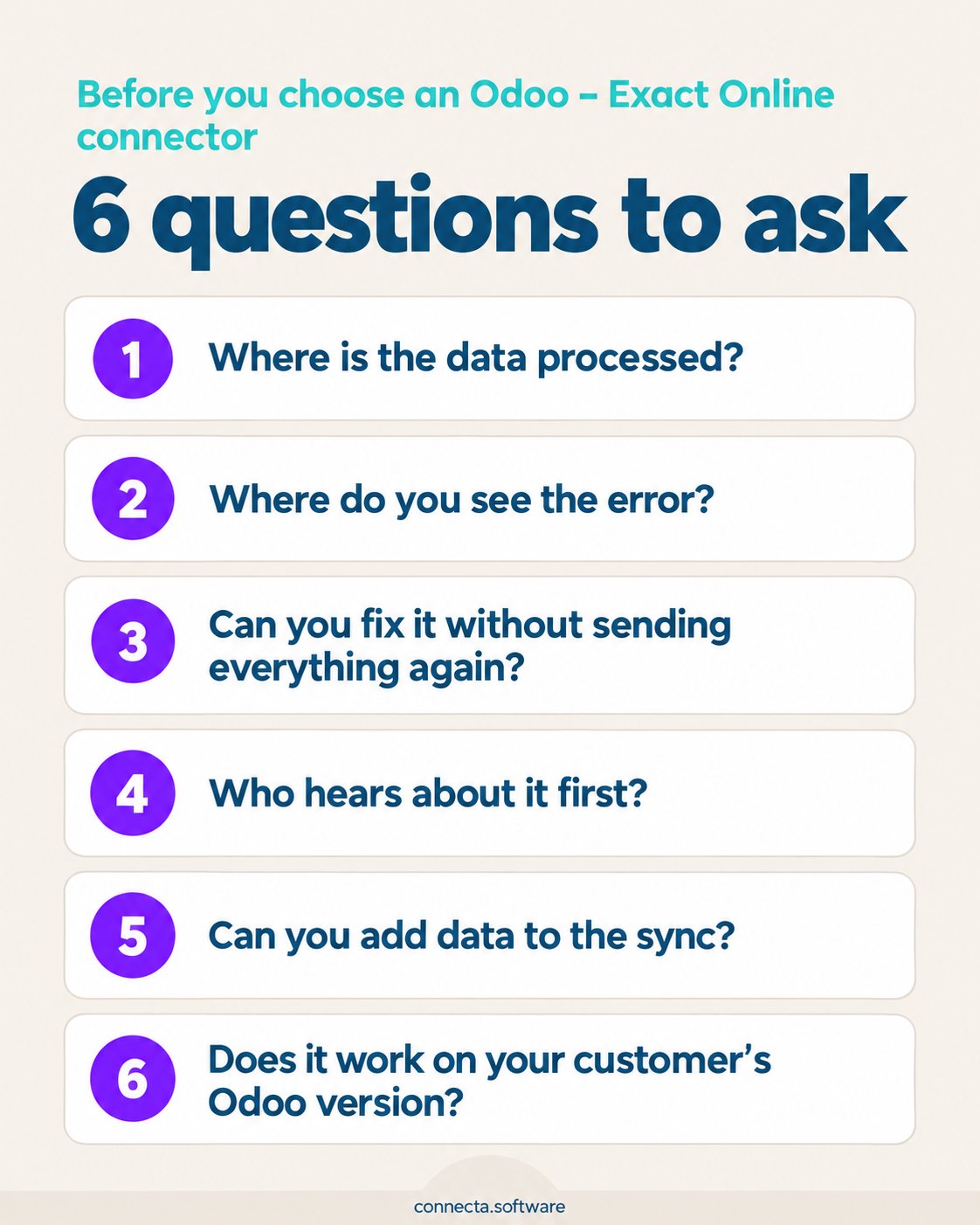
- Where is the data processed? If the connector runs on another platform, your customer's invoices, contacts, and payments go through a third party. Ask whether a copy stays there. If it does, that's one more company holding their financial data and one more processor in their GDPR records.
- Where do you see the error? Inside Odoo, or somewhere you have to log in to separately? If it's somewhere else, you have to open another tool before you can even start looking.
- Can you fix it without sending everything again from Odoo? When one invoice fails, can you retry just that one? And after a hiccup, can you retry the whole batch at once?
- Who hears about it first? The worst way to find out is a message from the accountant.
- Can you add data to the sync? When a customer starts an internal project and needs new fields, they'll expect it done within days.
- Does it work on your customer's Odoo version? And if the next project starts on Odoo 20, does it work there too?
How does Connecta's Exact Online connector answer those questions?
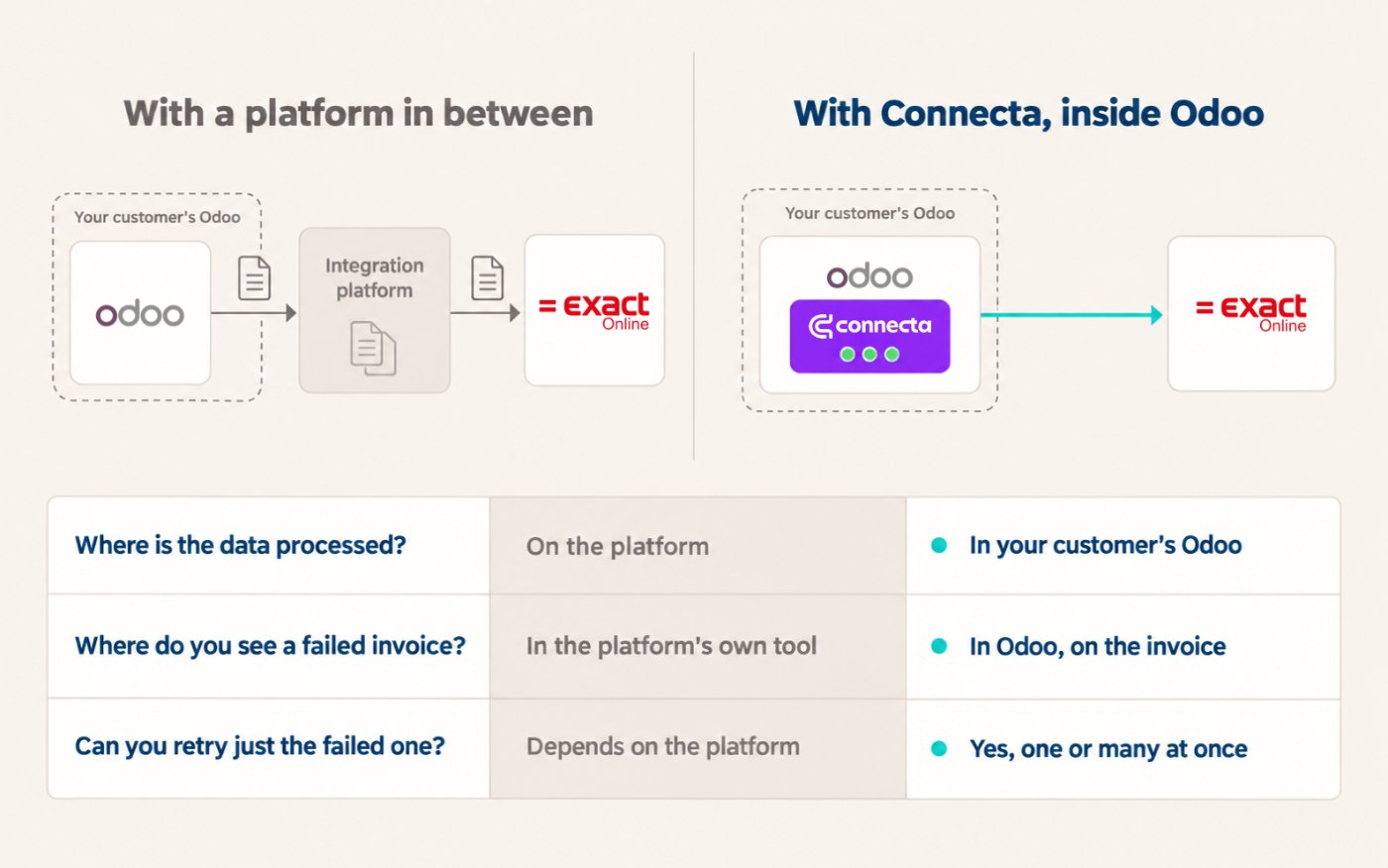
- Where the data is processed: inside your customer's own Odoo. Connecta runs as a native Odoo app. No other platform sits in between or keeps a copy of the data, so there's no new processor to add to your customer's GDPR records.
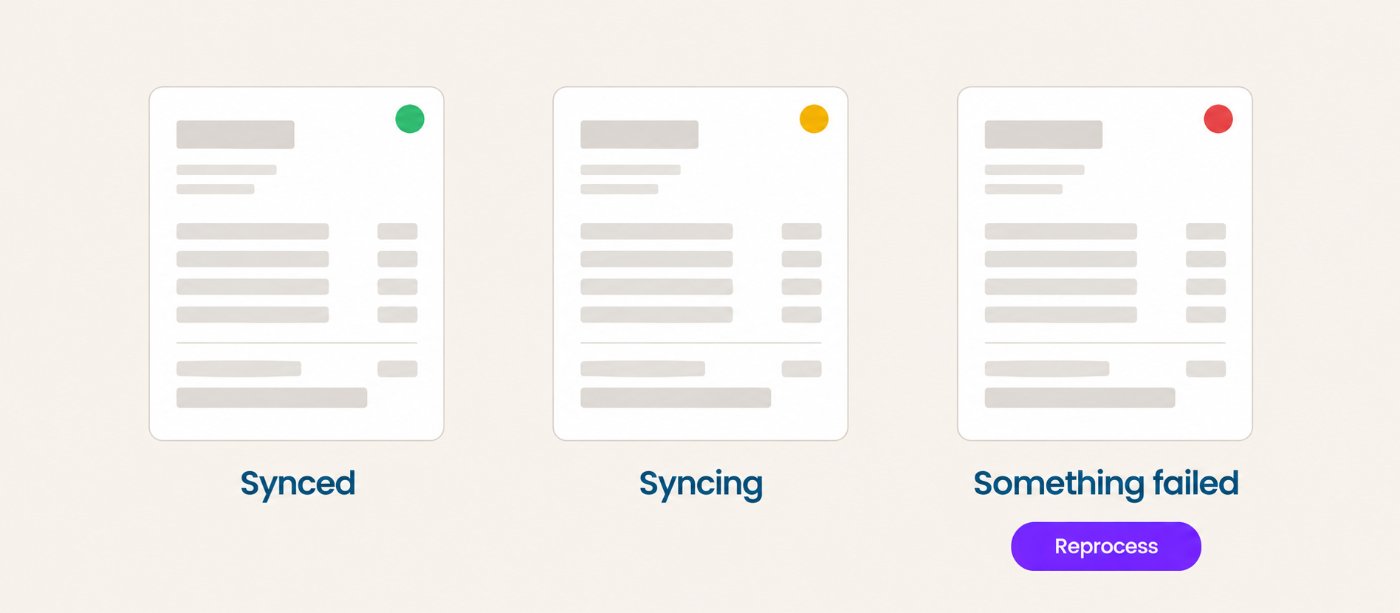
- Where you see the error: in Odoo. The dashboard shows the log of each connection and points to where the error is. And on each invoice, a light shows the status: green when it's synced, yellow while it's syncing, red when something has failed.
- How you fix it: you reprocess the invoice that failed, or many at once, instead of sending them again from Odoo.
- Who hears about it first: your customer gets an alert when something fails, and the dashboard takes them straight to the problem.
- Adding data: adding a new field to the sync takes a click, no coding. And if you need other data synced, you ask Connecta.
- Versions: the Exact Online connector isn't tied to one Odoo version, and it works on Odoo 20.
What does Connecta's Exact Online connector sync?
Invoices and payments go one way, from Odoo to Exact Online. Contacts and products can change on either side. And the accounting setup comes from Exact Online, so it can be matched in Odoo.
From Odoo to Exact Online
Contacts. Accounts and contact persons are sent to Exact Online. The match mode is configurable, so you decide how an Odoo contact is paired with an existing Exact Online account. Custom fields can travel with them.
Products. Odoo products become items in Exact Online.
Customer invoices. Posted customer invoices are synced automatically. In the settings, you choose how they arrive: as sales entries (booked as financial transactions) or as invoices to print or mail from Exact Online.
Missing contacts and products. If an invoice refers to a customer or a product that doesn't exist yet in Exact Online, the connector can create it when the invoice is synced. The invoice doesn't wait for someone to add it by hand.
The invoice PDF. The PDF can be uploaded to Exact Online, so the document sits next to the entry.
Payments. Payments are sent as cash entries, and you decide which general ledger account each payment method uses.
Cost centers and cost units. If you use analytic accounting in Odoo, cost centers and cost units go to Exact Online too.
From Exact Online to Odoo
Changes to contacts and items. When a contact or an item changes in Exact Online, Odoo is notified and updates it on its own. Nobody has to copy the change.
A full import. You can import all contacts and all items from Exact Online into Odoo. That's how you do the initial data load.
The accounting setup. General ledger accounts, journals, VAT codes, and payment conditions are retrieved from Exact Online, so they can be matched with Odoo's.
Frequently asked questions
Can Odoo connect to Exact Online?
Yes. There are several ways: general automation tools, SQL-based tools, custom development on both systems' APIs, integration platforms, and apps that run inside Odoo.
Does the Connecta connector sync both ways?
Partly. Contact and item changes come back from Exact Online to Odoo automatically, and Exact Online's accounts, journals, VAT codes, and payment conditions are retrieved for matching. Invoices and payments go one way, from Odoo to Exact Online.
Does the data pass through another platform?
No. The data is processed inside your own Odoo database, with no other platform holding a copy of it.
Which Odoo apps does it need?
The Accounting and Products apps. The connector isn't tied to one Odoo version, so it also works on Odoo 20.
The day an invoice doesn't arrive
Any of these options can send an invoice to Exact Online. The difference shows up when one doesn't make it.
If you see it in Odoo and reprocess it there, the accountant doesn't have to chase you. And the next time a lead mentions Exact Online, you already have the answer.
See it on your own project
If you're working on an Odoo project where the accountant stays in Exact Online, we'll show you the connector on your own project.
Book a demo See the connector