A partner sent us a folder of XSD files. A few hours later there was a working integration inside Odoo: settings screen, product and order selection, scheduled dispatch and all. Here is exactly what happened, what the AI did, and what we still had to do ourselves.
The starting point: a folder of XSD files
This is about as classic as B2B integration gets. Type 2 Solutions works with XML messages and, like every serious XML party, publishes XSD files: the schemas that define exactly what a valid message looks like. Which elements exist, in what order they must appear, which ones are mandatory, which datatypes are allowed, and which values are permitted for each field.
That folder is the contract. And normally it is also where the estimate starts. Someone reads the schemas. Someone translates them into a mapping. Someone builds a settings screen so the credentials are not hard-coded. Someone defines which products and which orders qualify. Someone schedules the dispatch, adds logging and writes the error handling. Then everyone tests, and discovers that half the assumptions were wrong.
What we did instead
Connecta ships with a built-in MCP server. We pointed Claude at the MCP server of this Odoo, handed it the XSD files, and described in plain language what the connection had to do.
What came back was not a document and not a code suggestion. It was working configuration, inside Odoo:
A connector setup
For the Type 2 Solutions endpoint, including authentication and the runtime settings around it.
The outgoing mappings, derived from the schemas
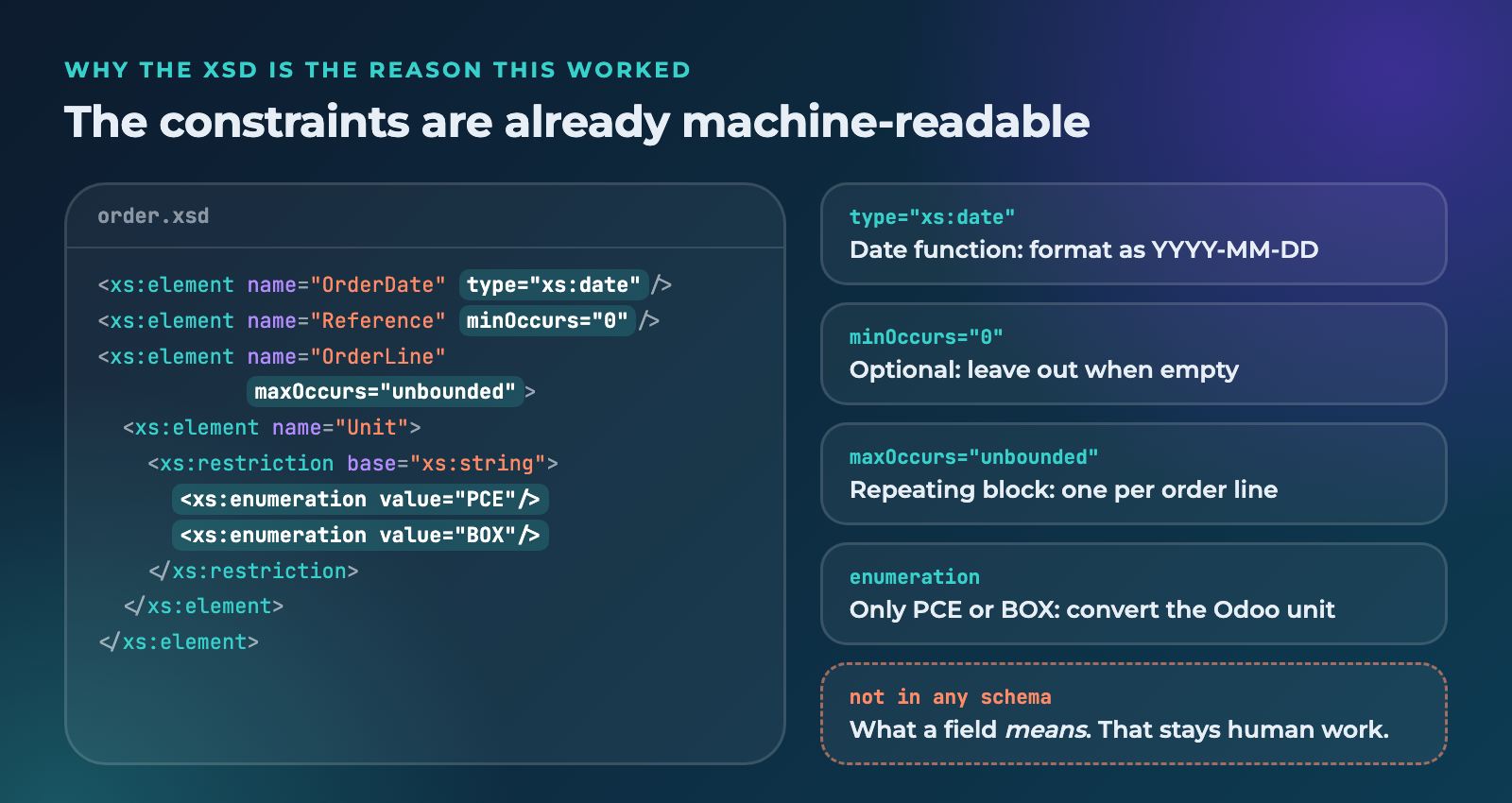
Element names, nesting, cardinality, datatypes and permitted values were taken straight from the XSD instead of from a hand-written interpretation of it.
A settings screen
Where the connection is configured: endpoint, credentials, company, the on/off switches. Not constants buried in a module.
Product and order selection
The filters that decide which products get published and which orders are sent. Configurable in the interface, not baked into the mapping.
A scheduled flow with a timer
Messages go out on the interval we set, rather than on a cron job someone has to remember exists.
Logging and monitoring per step
A rejected message shows you what was sent, what came back and where it stopped.
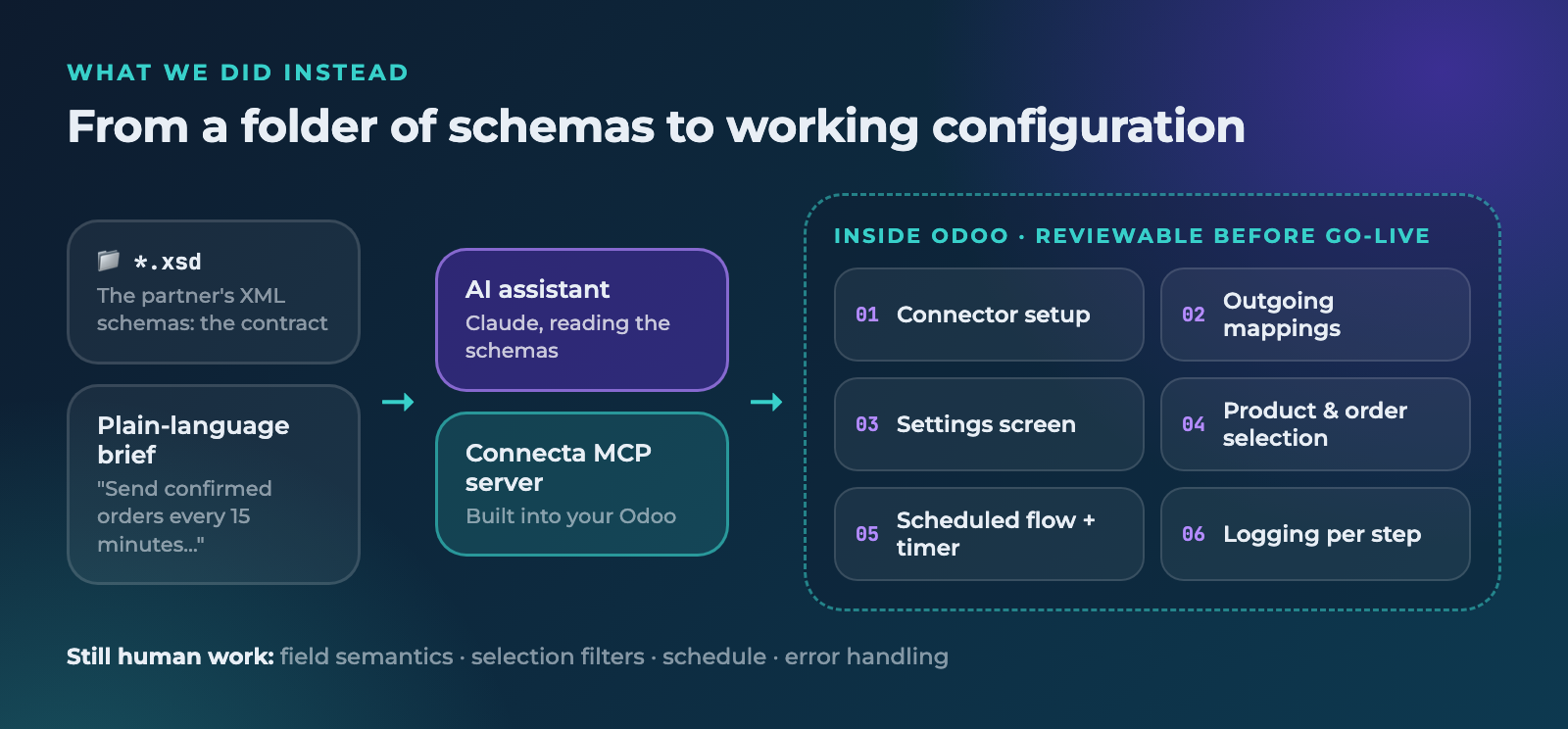
All of it visible in the Connecta Dashboard, in the same screens the team already uses.
Why the XSD is the reason this worked
This is the part worth taking away, and it has little to do with hype.
Most of the effort in a traditional integration goes into translating a human-readable specification into a machine-readable mapping. You get a PDF, an email thread and a sample file. You interpret them. You build. Then testing reveals that "optional" meant "mandatory in practice", that the date format is different from the example, and that one field only accepts four specific values.
An XSD removes that translation step, because the constraints are already explicit and machine-readable. Cardinality, datatypes, restrictions, enumerations: they are all in the schema. An AI reading it gets those constraints exactly right, and the mapping is generated against the schema rather than guessed alongside it.
What we reviewed, and changed
Nothing went live because an AI built it. Everything the AI produced was configuration in Odoo, which means it was reviewable before it did anything at all. Four things needed our hands:
- Field semantics. Which Odoo field belongs behind which element, checked line by line. This is where the corrections were.
- The selection filters. The first version was too generous about which products qualified. We tightened it.
- The schedule. We started conservatively and increased the frequency once the first batches ran clean.
- Error handling. What happens when Type 2 Solutions rejects a message, who gets notified, and what the retry behaviour should be.
That review is not a footnote, it is the point. The value is not an AI that decides for you. It is an AI that removes the mechanical work so your attention goes to the four decisions that actually matter.
Why an AI can build this at all
It is tempting to conclude that the AI is simply faster than a developer. That is not really it.
The reason this works is architectural: in Connecta, an integration is configuration. Apps, connector setups, mappings, flows, settings screens and schedules are records inside your Odoo database, reachable through a documented interface. There is no source tree to navigate, nothing to compile, no branch, no deploy pipeline, no second environment.
That is what makes an integration something an AI can build safely, and just as importantly, something a human can review afterwards without reading code. The same Connecta screens that let your functional consultant change a mapping are the ones the AI writes into. Same data, same security model, same logs, same undo.
An AI pointed at a traditional connector would be editing Python in a repository. Nobody wants to review that on a Friday afternoon.
What this means for your next integration
If your partner publishes XSD, WSDL, OpenAPI or a JSON schema, you are holding more than documentation. You are holding an input.
The next time a supplier, carrier or customer sends you their schemas, the question is not how many days it will take to interpret them. It is how quickly you can get them in front of something that reads them properly, and how much of the result you can review in an interface you already understand.
Let your AI build the next one
Bring your partner's schemas to a 30-minute demo and see MCP turn them into a live, monitored flow inside your own Odoo.
Book a demo