Standard connectors demo beautifully. Orders come in, invoices go out, stock stays in sync. The demo works because the demo database is standard. Yours isn't, and that gap is where most integration budgets quietly disappear.
The demo database is not your database
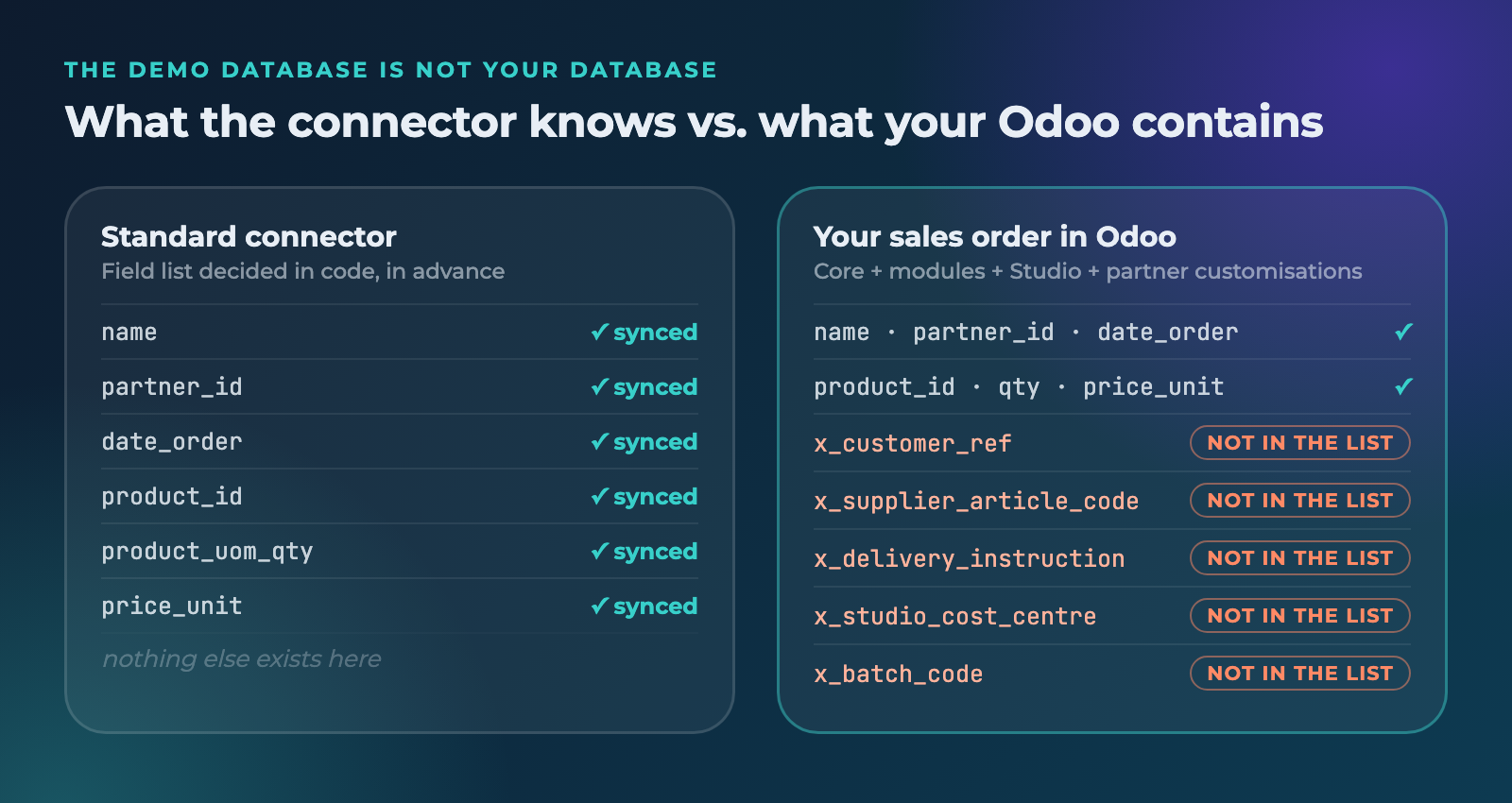
Give it two weeks after go-live and the list starts. A customer reference on the sales order that your account manager fills in by hand. A supplier article code on the product, because your wholesaler orders by their number and not by yours. A delivery instruction the warehouse actually reads. A cost centre on the invoice line that finance needs for the monthly close. A batch code, a project number, a serial reference, a "do not combine with" flag.
None of these are exotic. They are the fields that make your process your process. Some came from a module, some from Odoo Studio, some your implementation partner added last quarter. And almost none of them appear in the standard field list of a connector.
What happens when a connector can't see your fields
In most connectors, the field list is a decision made in code, long before anyone looked at your database. There is a mapping somewhere: a Python dictionary, an XML data file, a JSON config buried in a module. And it contains exactly the fields the vendor thought you would need.
So a request as small as "please also send our customer's own article code" turns into a project:
- A change request to the vendor or your implementation partner.
- A developer who has to find the right mapping, in the right file, in the right module, and work out which of the four places that reference the same field is the one that actually runs.
- A branch, a test database, a deploy window.
- A customisation that is now, in practice, a fork of a standard module.
And then it repeats. Every connector update risks a merge conflict or, worse, silently overwrites your change. Every Odoo upgrade is a new test round for a customisation nobody remembers the reason for. When a message is rejected six months later, the log tells you a record failed, not which field and not why.
The cost is never one number on one invoice. It is the change-request fee, plus developer hours, plus a test cycle, plus a deploy, plus the same thing again at the next upgrade. And it is lead time: days or weeks for something that is conceptually just "also send this field".
The second failure mode: the workaround
The more common outcome is that nobody asks. The field is too small to justify a change request, so the business routes around the integration. The article code goes into a note field. Someone keeps a spreadsheet next to Odoo. The warehouse prints a list every morning and checks it by hand.
The integration is live and green on the dashboard. The process is still manual. That is the expensive version, because it never shows up as a cost. It shows up as errors, delays and people.
In Connecta, a mapping is configuration, not code
Connecta runs as native Odoo applications, inside your own database. That single architectural choice is what makes custom fields a non-issue instead of a change request.
Every field, including the one you added yesterday
The mapping editor reads your actual Odoo models through Odoo itself. The field list you see is not a list someone typed in advance, it is your model. Core fields, module fields, Studio fields, fields your partner added last week: they all appear, with their technical name next to the label, searchable. A field you create this morning is selectable this afternoon.
Follow the relations, not just the record
Real mappings rarely stay on one model. You need the field that lives one hop away: order line, product, supplier info, the code you are after. Connecta lets you walk those relations in the mapping itself, so the value ends up in the message without a helper field or a scheduled job to copy it there.
Preview on a real record, before anything goes live
An outgoing mapping can be rendered against an actual record from your own database, so you see exactly what the receiving system will get. Not sample data, not a schema: the real message for order S00412. Most mapping mistakes are visible in that preview in about ten seconds, which is roughly ten weeks earlier than the alternative.
Versions instead of deploys
Changes go into a new version of the mapping as a draft. You preview it, you activate it when it is right, and the previous version stays where it was. Rolling back is a click, not a redeploy. And because it all lives inside Odoo, there is no second environment to keep in sync.
Conversions come with it. The receiving party wants the date in a different format, the quantity without decimals, an empty value replaced by a default, or two fields concatenated into one reference. Those are mapping functions you pick in the interface, per field, not a Python method someone has to maintain.
The standard connectors run on exactly the same engine
This is the part that matters most, and it is easy to miss.
In Connecta there is no "standard mode" and "custom mode". The ready-made apps, from Shopify and Exact Online to Pipedrive, Nmbrs and Loket, ship with a sensible default mapping built with the same editor you use. You open it and extend it. Adding your custom field is the same action as changing a standard one, and it takes about as long.
Worked example: one extra field on the order line
Say your customer wants their own article code on every order line you send them. It lives in a custom field on the supplier info of the product.
- Open the outgoing order mapping and create a new draft version.
- In the order-line block, add a field. Search by name or technical name, and follow the relation to the supplier info record.
- Add a mapping function if the format needs adjusting: uppercase, prefix, fallback value.
- Preview against a real order and read the message that comes out.
- Activate the version.
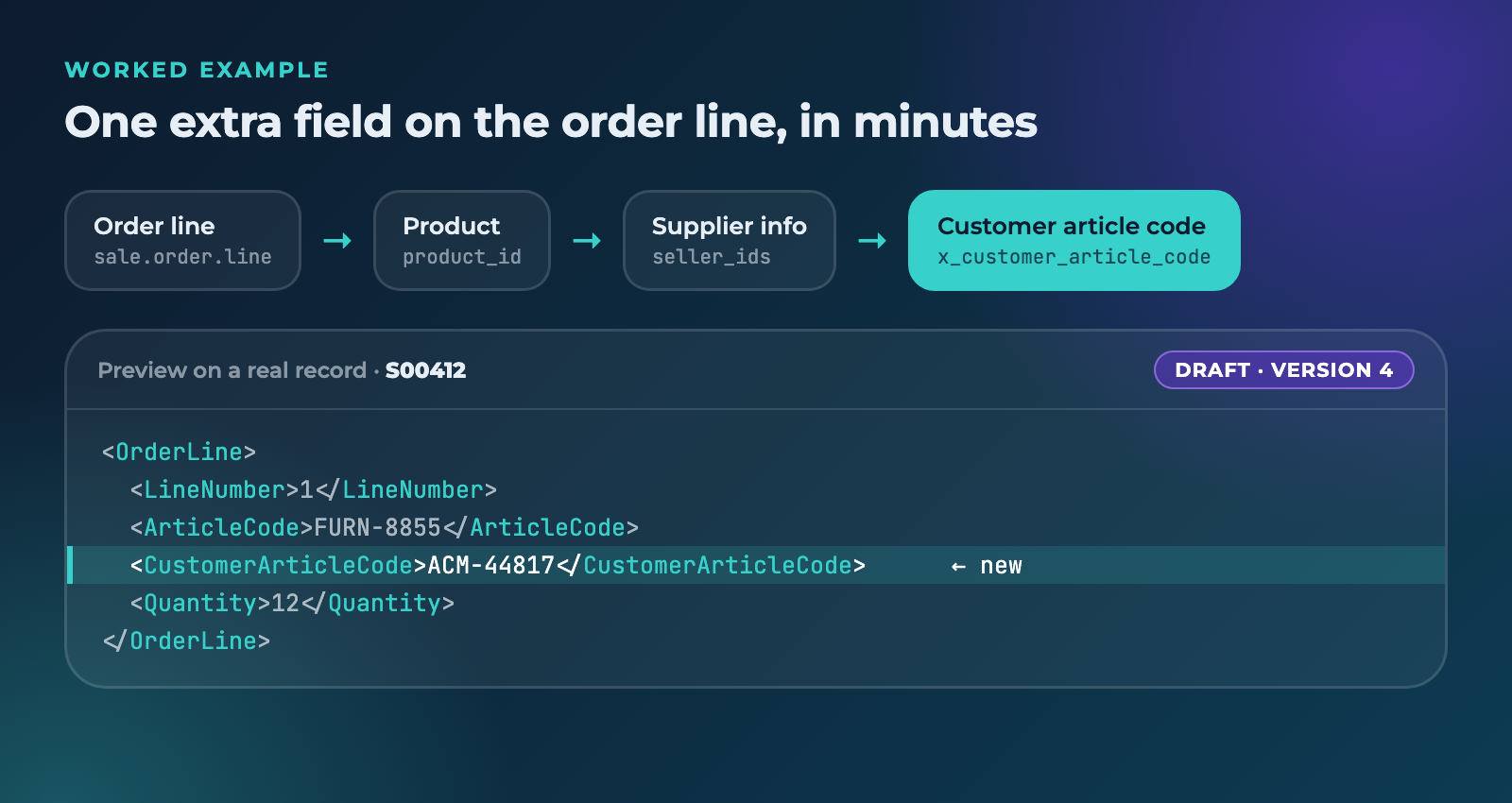
Minutes. No branch, no test database, no deploy window, no invoice, and nothing that will break at the next update.
Why this only works from inside Odoo
External middleware sees Odoo from the outside, through an API. It has to be told what your schema looks like, which is why custom fields need to be declared, mapped and re-declared whenever they change, and why some of them simply are not reachable. Add a field and you have work in two places, plus a version-compatibility question every time either side updates.
Connecta does not have that problem, because there is no outside. It runs on Odoo's own ORM, so your models are the field list. Access rights still apply. Writing back goes through Odoo's business logic, so your validations, automations and constraints keep doing their job instead of being bypassed by a direct API write. And your data never leaves the database it already lives in.
What "standard" should actually mean
A standard connector is not one that fits every business. That connector does not exist, and the ones that claim to are the ones that turn into change requests.
A standard connector is one that gets you most of the way in an afternoon, and then does not fight you over the rest. Your custom fields are not an edge case to be negotiated. They are the reason you run Odoo instead of a spreadsheet.
Bring us your weirdest field
See in 30 minutes how your own custom fields map in Connecta. Live, on your own models, no slideware.
Book a demo